Run the agent on the device
The same chat with a model that runs in the visitor's browser, through Chrome's built-in model or transformers.js. No server, no API key, nothing leaves the device.
@webmcp-agents/local-agent is an AgentAdapter for <AgentChat> whose model runs in the visitor’s
browser. There is no server and no API key, and nothing the person types leaves the device. It sits next to the cloud
assistant: the chat shows a switcher, Claude (cloud) and On-device.
Add it to the chat
You already have the chat from Add the chat. Install the adapter, create both adapters once per page
(outside any component), and hand them to <AgentChat>.
npm install @webmcp-agents/local-agentpnpm add @webmcp-agents/local-agentyarn add @webmcp-agents/local-agentbun add @webmcp-agents/local-agentnub add @webmcp-agents/local-agentaube add @webmcp-agents/local-agentThe model runs in a module Web Worker that the package creates with new Worker(new URL(…, import.meta.url)), so the
bundler must see it unbundled. How you say so depends on the framework.
import { createCloudAdapter } from "@webmcp-agents/chat";
import { createLocalAdapter } from "@webmcp-agents/local-agent";

const adapters = [createCloudAdapter(), createLocalAdapter()];

// …
<AgentChat agent={shopper} adapters={adapters} />
Keep the worker out of Vite’s dependency pre-bundling, and bundle it as an ES module:
export default defineConfig({
  // …
  optimizeDeps: { exclude: ["@webmcp-agents/local-agent", "@huggingface/transformers"] },
  worker: { format: "es" },
});
This is the setup the playground, Field Store and Skyline apps run.
"use client";

import { createCloudAdapter } from "@webmcp-agents/chat";
import { createLocalAdapter } from "@webmcp-agents/local-agent";

const adapters = [createCloudAdapter(), createLocalAdapter()];

// …
<AgentChat agent={shopper} adapters={adapters} />
The adapters live in a client component, because the model needs the browser. Next.js’s bundlers follow the
new Worker(new URL(…, import.meta.url)) form the package ships, so try it without any bundler config. No example app
runs the on-device adapter on Next.js yet: if the model never loads, hand the adapter a worker of your own (below).
import { createCloudAdapter } from "@webmcp-agents/chat";
import { createLocalAdapter } from "@webmcp-agents/local-agent";

const adapters = [createCloudAdapter(), createLocalAdapter()];

// …
<AgentChat agent={shopper} adapters={adapters} />
TanStack Start runs on Vite, so it needs the same two settings:
export default defineConfig({
  // …
  optimizeDeps: { exclude: ["@webmcp-agents/local-agent", "@huggingface/transformers"] },
  worker: { format: "es" },
});
No example app runs the on-device adapter on TanStack Start yet: the setting is Vite’s, not something this project has exercised there.
import { createCloudAdapter } from "@webmcp-agents/chat";
import { createLocalAdapter } from "@webmcp-agents/local-agent";

const adapters = [createCloudAdapter(), createLocalAdapter()];

// …
<AgentChat agent={shopper} adapters={adapters} />
Astro runs on Vite, and hands it options under vite:
export default defineConfig({
  // …
  vite: {
    optimizeDeps: { exclude: ["@webmcp-agents/local-agent", "@huggingface/transformers"] },
    worker: { format: "es" },
  },
});
No example app runs the on-device adapter on Astro yet: the setting is Vite’s, not something this project has exercised there.
If your bundler cannot follow the worker URL, pass the worker yourself. With Vite’s ?worker import:
import LocalWorker from "@webmcp-agents/local-agent/worker?worker";

createLocalAdapter({ worker: () => new LocalWorker() });
Which model runs
The first available provider wins:
| Provider | When | Download |
|---|---|---|
| Chrome’s built-in model (Prompt API) | desktop Chrome with the built-in model | none per site; Chrome manages it |
| transformers.js + WebGPU | WebGPU is available | Qwen3 0.6B, about 585 MB |
| transformers.js + WASM | no WebGPU | Qwen3 0.6B, about 934 MB, slower |
Other models are opt-in through model, or offered side by side through models: the chat then shows a picker with each
model’s brief, size and whether it is already on the device, and remembers the choice.
createLocalAdapter({
  models: [
    "onnx-community/Qwen3-0.6B-ONNX", // the default
    "onnx-community/Qwen3-1.7B-ONNX", // needs 8 GB and WebGPU
    "LiquidAI/LFM2.5-1.2B-Instruct-ONNX",
  ],
});
LiquidAI/LFM2.5-1.2B-Instruct-ONNX (about 764 MB) is trained for tool calling and handles multi-step tasks Qwen3 0.6B
cannot, but needs a strong GPU and plenty of free memory. Qwen3 1.7B (1.4 GB) reasons better and needs 8 GB and WebGPU.
What the visitor sees
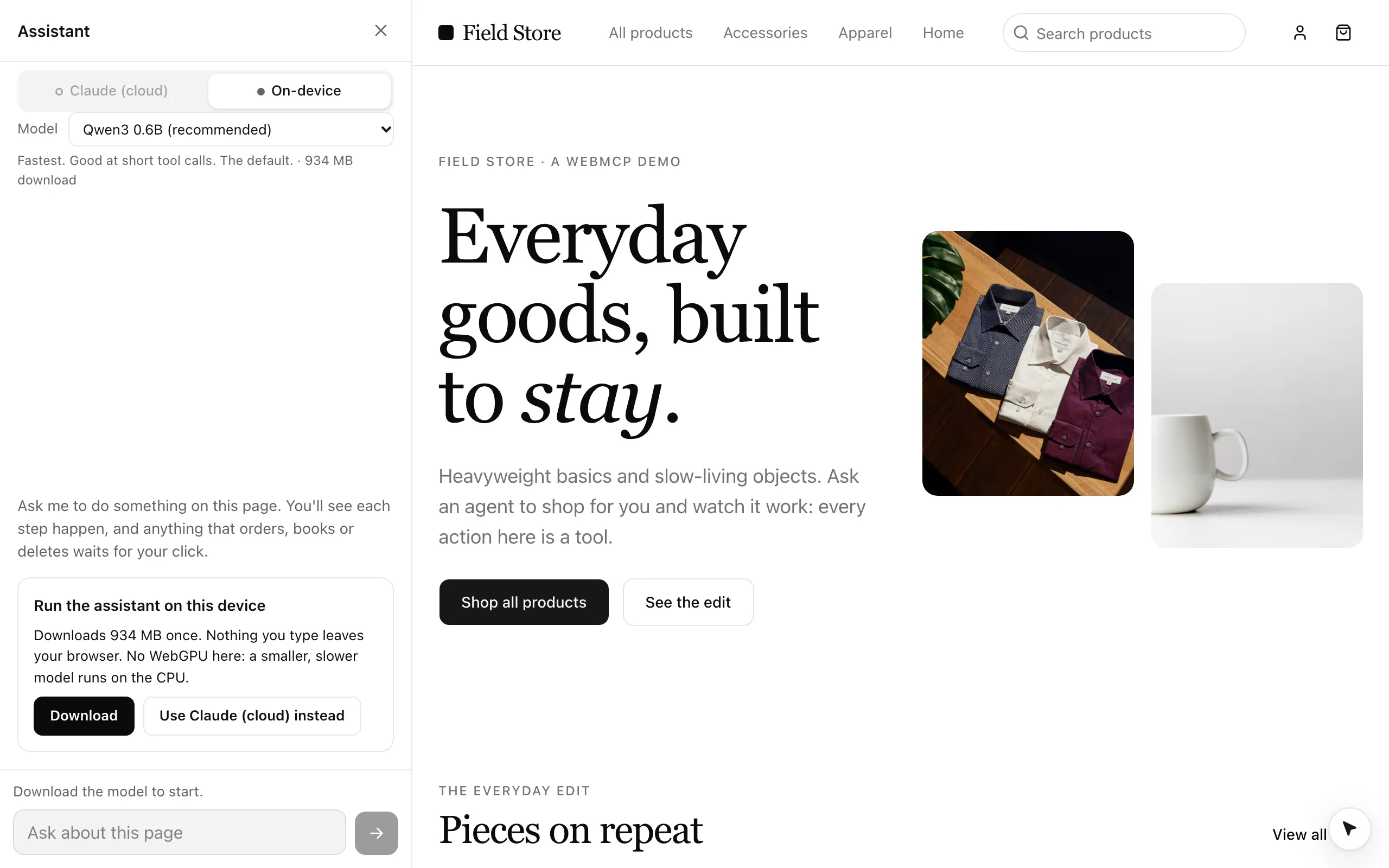
- Consent first. Nothing downloads until the person clicks Download in the chat, which shows the size. Progress is determinate, and Cancel stops it.
- Downloaded once. Files are kept in the browser’s Cache API and the page asks for persistent storage, so a returning visitor loads from disk. The chat asks transformers.js whether the files are there, so it never shows a Download button for a model that is, and a load from disk reads “Loading the model from this device…”, not “Downloading”.
- No jank. The model and ONNX Runtime load only inside the worker, so generating never stutters the page or the cursor. Your main bundle does not include them.
Site instructions
Small models cannot infer a site’s flow from tool names. Give the page an agent (Define an agent): the on-device model reads its instructions and tool subset in the browser, the same definition the cloud reads on the server.
const concierge = defineWebAgent({
  id: "concierge",
  instructions: `Skyline books flights in this order: search_flights,
then list_results, then select_flight with an id from the results,
then fill_traveler_details, then book_flight (the user confirms on the page).`,
});
They go into the system prompt under “About this site”. Keep them short: every token counts against a small context
window. Without an agent, createLocalAdapter({ instructions }) still works as a fallback.
Guard rails for small models
The loop is built for models of a billion parameters or so:
- at most 8 tools per step, ranked against the request, with compact schemas;
- tool calls parsed leniently, checked against the schema, and fed back once if wrong;
- replies checked before they are shown: a reply that claims a failed call worked, or tells the person to click a button a tool could press, is corrected;
- at most 6 steps and 60 s per step, and a stop when the same call repeats.
Not freezing the machine
A model on WebGPU holds hundreds of megabytes of GPU memory, shared with the whole system on Apple silicon. So the provider loads one model per browser (a Web Lock shared by every tab), frees it when the page is hidden, refuses models over 650 MB on devices reporting less than 8 GB of memory, and caps the prompt length.
Limits
Models this size handle one explicit action well (“add 2 mugs to the cart”) and multi-step plans poorly. Offer the cloud
assistant next to it for anything bigger. Full reference: createLocalAdapter.