Playground
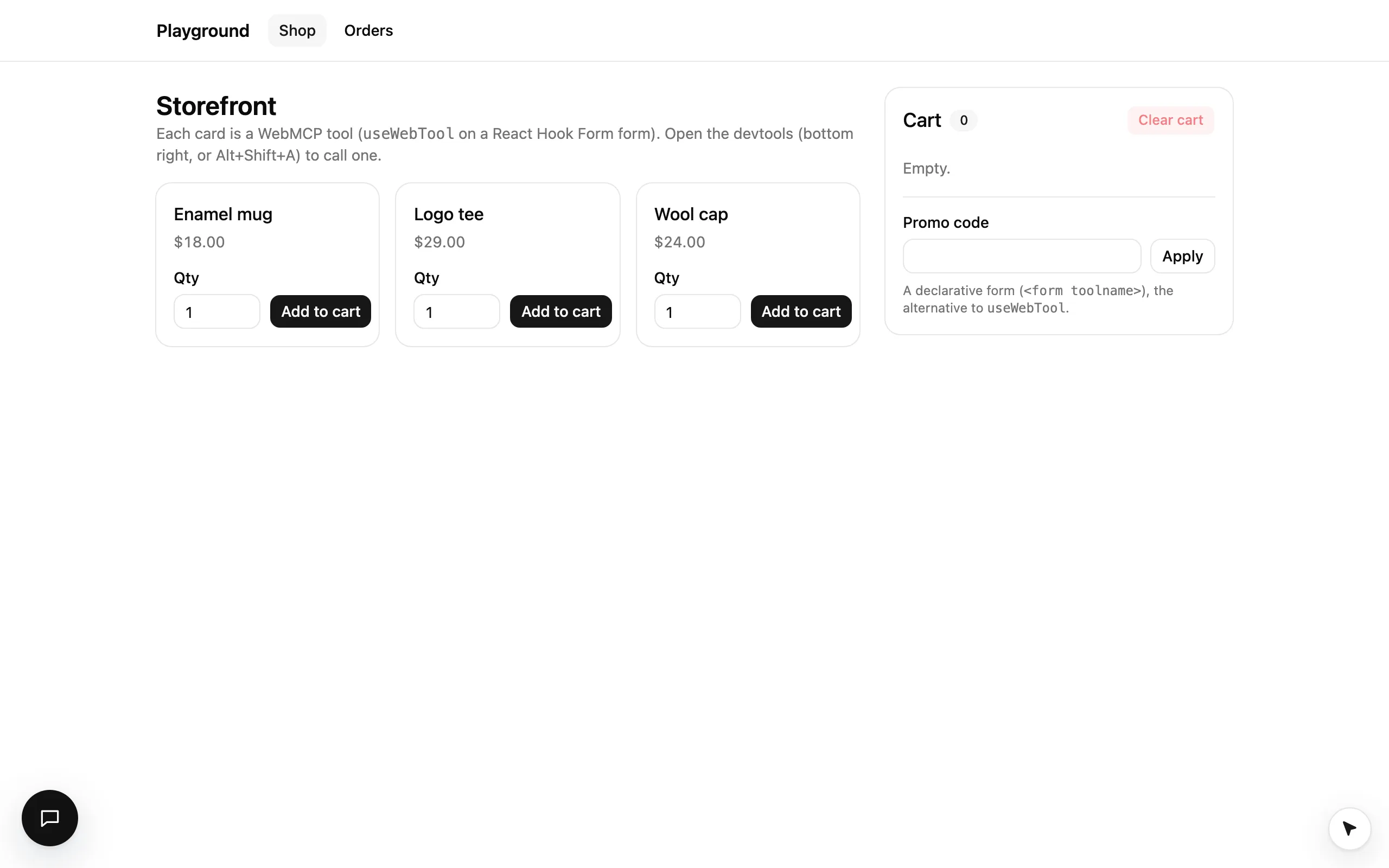
A small storefront in examples/playground where every action is a WebMCP tool: buttons, forms on React Hook Form, an app-wide catalog, a path-scoped tool and one declarative form.
examples/playground is the smallest complete example: a storefront where every action is a tool, with one of each kind. Start
here to see the whole shape on one screen, then read Field Store for a realistic app.
Run it
pnpm install
pnpm --filter @webmcp-agents/example-playground dev    # http://localhost:5173
With ANTHROPIC_API_KEY in examples/playground/.env.local, the Assistant (bottom left in development) does everything
below from a sentence: “add three mugs and check out with code 123”.
The layers
- examples/playground/src/
- webmcp-agents/ (the tools; nothing in the markup is for the cursor)
- tools/
- index.ts (the catalog: get_cart everywhere, list_orders on /orders)
- get-cart.ts
- list-orders.ts
- hooks/
- use-add-to-cart.ts (add_to_cart_SKU: a tool with input, on React Hook Form)
- use-clear-cart.ts (clear_cart: a button,
requireConfirmation) - use-place-order.ts (place_order: a button,
requireConfirmation) - use-remove-promo.ts (remove_promo)
- use-apply-promo.ts (apply_promo: the one declarative form, the alternative)
- tools/
- components/
- add-to-cart-form.tsx
- clear-cart-button.tsx
- place-order-button.tsx
- remove-promo-button.tsx
- apply-promo-form.tsx
- hooks/use-cart.ts
- app.tsx (
<WebAgentsProvider tools={tools}>, chat;?tanstackswaps the provider’s devtools panel for a TanStack Devtools tab, devtools.tsx) - pages/orders.tsx (the /orders page)
- store/cart.ts (the cart, a store outside React)
- main.tsx (render; the provider loads the polyfill where it is needed)
- webmcp-agents/ (the tools; nothing in the markup is for the cursor)
Tools
| Tool | Kind | On | Confirm |
|---|---|---|---|
add_to_cart_<sku> |
useWebTool + React Hook Form, one per product card |
always | no |
apply_promo |
declarative form (<form toolname>) |
until a code is applied | no |
remove_promo |
useWebTool on the Remove button |
while an applied code is shown | no |
place_order |
useWebTool on the Place order button |
while the cart has items | yes |
clear_cart |
useWebTool on the Clear cart button |
while the cart has items | yes |
get_cart |
catalog, read-only | everywhere | no |
list_orders |
catalog, match: "/orders" |
on /orders |
no |
Patterns worth copying
- One function, two callers. Each button and each form submits to the same function the tool runs. The cursor finds the
button by the tool’s
title; nothing is added to the markup. Three product cards each have an “Add to cart” button, so each button’s accessible name says which product (aria-label="Add to cart: Enamel mug") and that is the tool’s title. Define a tool. - A tool is on while its component is.
clear_cartandplace_orderare registered only while the cart has items;useWebToolkeeps a tool alive until its own call is answered. Tool lifecycle. - Wait for the person.
place_orderandclear_cartpark the cursor on the button until a real click. Confirm before it runs. - A catalog tool with a
match.list_ordersis on while the path is/orders; the provider needs nothing from the router. Tools across your app. - One declarative form, labelled as the alternative in the UI, with
useToolAnswerso it can hide itself after applying a code. Declarative forms.
Try it
Open the devtools (bottom right, or Alt+Shift+A):
Add to cart
Run add_to_cart_mug-01 with qty 3. Its row already says Control button · Add to cart: Enamel mug, Fields qty → spinbutton · Qty. The cursor glides to that card’s Qty field, types 3, clicks Add to cart, and the cart
updates at the click.
Apply a promo
Run apply_promo with {"code":"123"}. The totals show 10% off, and the form (and its tool) goes away; Remove
brings it back. Any other code shows an error under the field, and the agent gets the same message.
Place the order
Run place_order. The cursor parks on Place order with Click "Place order" to confirm. Click it yourself to
finish.
Take over
Run add_to_cart_tee-02 and move your mouse while the cursor travels. It vanishes; the tool still completes.
From the console: await agent.invoke("add_to_cart_mug-01", { qty: 3 }).